How to improve your customer support workflow
A practical guide to improving the day-to-day support workflow — assignments, macros, automations, SLAs, KB and CRM, all in one tool.
Free forever for small teams · 90-day Pro trial · No credit card
Why teams switch to Tixallo
- One workflow from email / form / chat → ticket → resolution.
- Assignments and notes so context isn't trapped in DMs.
- Macros, automations and SLAs do the repeatable work.
- KB and portal lower the volume of easy questions.
- CRM gives every conversation context (plan, account, last reply).
A quick look
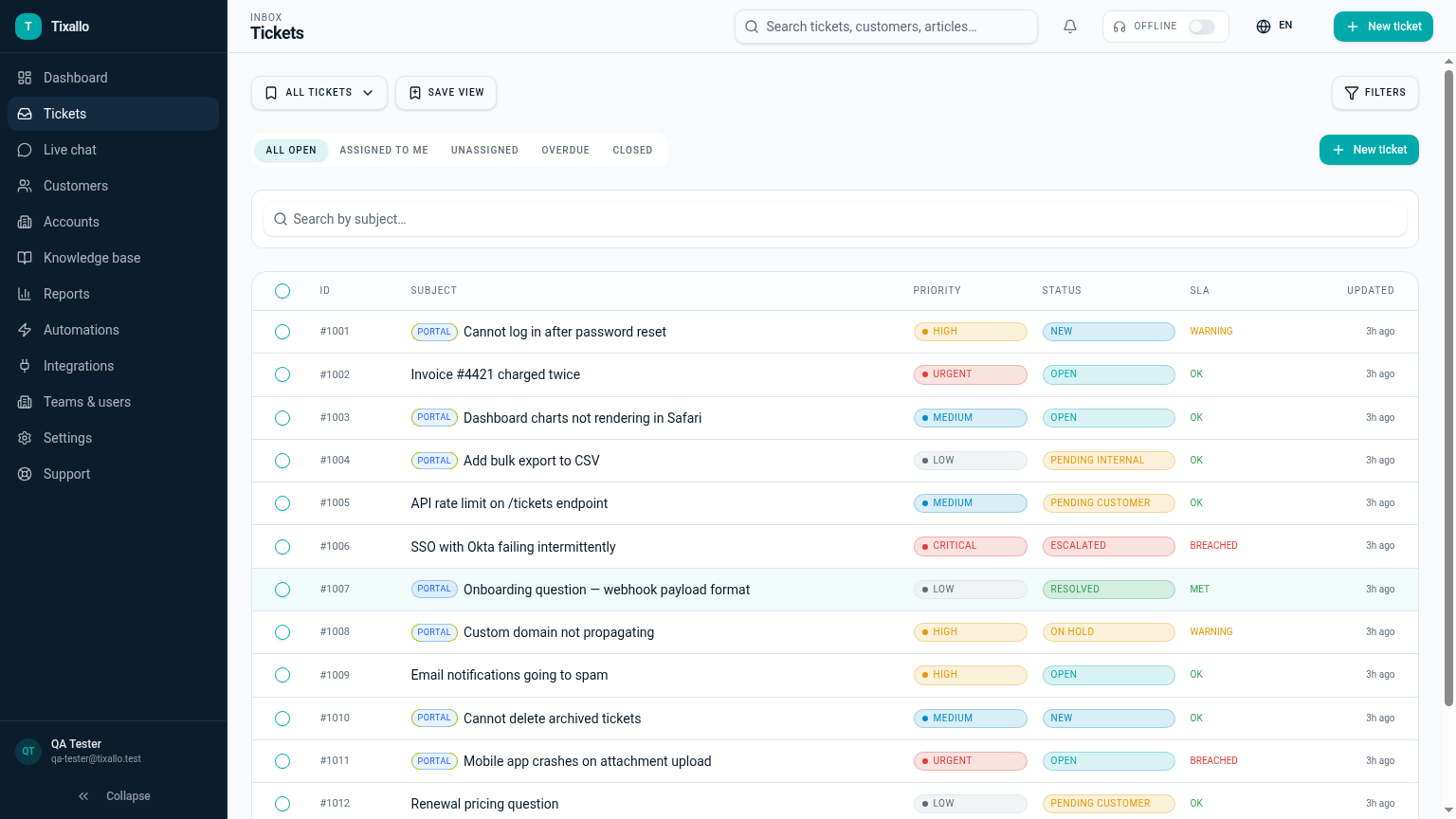
What Tixallo includes today
We only list features that are live in Tixallo right now. No roadmap-stuffing.
- Shared inbox with assignments, tags and internal notes
- Macros and saved replies
- Automations and SLA reminders (Pro trial)
- Public KB + customer portal
- Customers + Accounts CRM with custom fields
- Saved views with multi-condition filters
- Mobile-friendly agent app + PWA
Best fit / not best fit
Tixallo is a great fit if…
- Your current workflow is 'whoever sees it first'.
- You want fewer manual steps without enterprise admin.
- You want one tool from intake to resolution.
Tixallo is not the right pick if…
- You need a full BPM / workflow engine.
- You need a project-management suite as the primary tool.
- You need integrated voice / call centre.
Add Tixallo to your website in minutes
Website contact forms
Hosted form pages and copy-paste embeds turn site traffic into tickets — no developer required.
Add Tixallo to your websiteLive chat widget
A lightweight chat script your visitors can use immediately. Conversations land in the same shared inbox as email.
See live chatThe problem
Most support workflows aren't designed — they accumulate. Someone forwards an email, someone else writes a Slack DM, a third person updates a spreadsheet, and the customer waits. Improving the workflow doesn't mean adopting a 90-page playbook; it means making each handoff explicit, removing the steps that don't add value, and letting the tool do the repetitive bits.
Step-by-step
- 1
Map the current workflow on one page
Where do tickets enter (email, form, chat, social)? Who triages? Who answers? Who escalates? Who closes? Most teams discover two or three steps that exist only because nobody removed them.
- 2
Pick one entry point per channel
All email goes through Tixallo. All web forms go through Tixallo. All chat goes through Tixallo. Multiple entry points per channel are why context gets lost.
- 3
Define what 'assigned' actually means
An owner is the one person responsible for the next move. Status ('open', 'pending customer', 'resolved') tracks where the ticket is, not who owns it. Both fields filled in, always.
- 4
Add macros and automations for the boring 60%
Welcome reply, billing-question reply, 'we need more info' reply, 'we shipped a fix' reply. Then automations for routing by topic and tagging by sender domain.
- 5
Define escalation paths up front
Bug → engineering view + Slack ping. Refund → billing owner + tag. Outage → on-call + SLA escalation. Make the path obvious so nobody has to ask 'who do I send this to?'
- 6
Review weekly, change one thing
Spend 15 minutes a week looking at the breached-SLA list and the top three tags. Make one change per week — a new macro, an automation, a KB article. Compounds fast.
Common mistakes to avoid
- !Designing the workflow without the people who will run it.
- !Adding a status for every nuance — 5–7 statuses is enough.
- !Routing by gut feel instead of automations — tagging slips when it's manual.
- !Treating Slack as the workflow — context disappears in two weeks.
- !Skipping internal notes and replying to the customer with engineering jargon.
- !Changing the workflow weekly so the team never learns it.
How Tixallo helps
- Ticketing system with automation
Codify routing, tagging, prioritisation and escalation in rules anyone can read.
- Shared inbox for support
Owner + status + internal notes mean every handoff is explicit.
- Ticketing system with knowledge base
Lower the volume on the 60% boring questions so the workflow can focus on the hard 40%.
- Reduce support response time
Companion guide for the response-time half of the workflow.
Frequently asked questions
Where do we start?
Forward support@ to Tixallo, invite the team, create 5 macros and 3 automations. That's a workable v1 in an afternoon.
Can each team have its own workflow?
Yes. Teams, saved views, automations and SLAs scope separately so different teams (e.g. support vs ops) can run their own flow.
How do we know the workflow is actually working?
Reporting on first-response time, resolution time, SLA compliance and per-tag volume gives you a weekly read. If the same tag keeps growing, that's where the next macro or KB article goes.
Can engineers / ops handle escalations without a Tixallo seat?
Use internal notes with @-mentions and email notifications, or hand the ticket off via a shared view. Heavy collaborators benefit from a seat; occasional escalation contacts often don't need one.
Free plan?
Free forever for small teams (2 agents, 100 tickets / month). Pro features are free for the first 90 days, no card.
Try Tixallo free
Free forever for small teams. Pro features free for 90 days. No credit card.