A shared inbox built for support, not a generic team mailbox
Tixallo's shared inbox handles email, website forms and live chat together — with assignments, tags, internal notes, merge and SLA timers a real support team needs.
Free forever for small teams · 90-day Pro trial · No credit card
Why teams switch to Tixallo
- One inbox for email, web forms and live chat — no tab switching.
- Real assignments — every conversation has an owner.
- Internal notes for handoffs without leaking context to customers.
- Ticket merge for those threads that arrive twice.
- SLA timers + escalation rules so nothing slips past first response.
A quick look
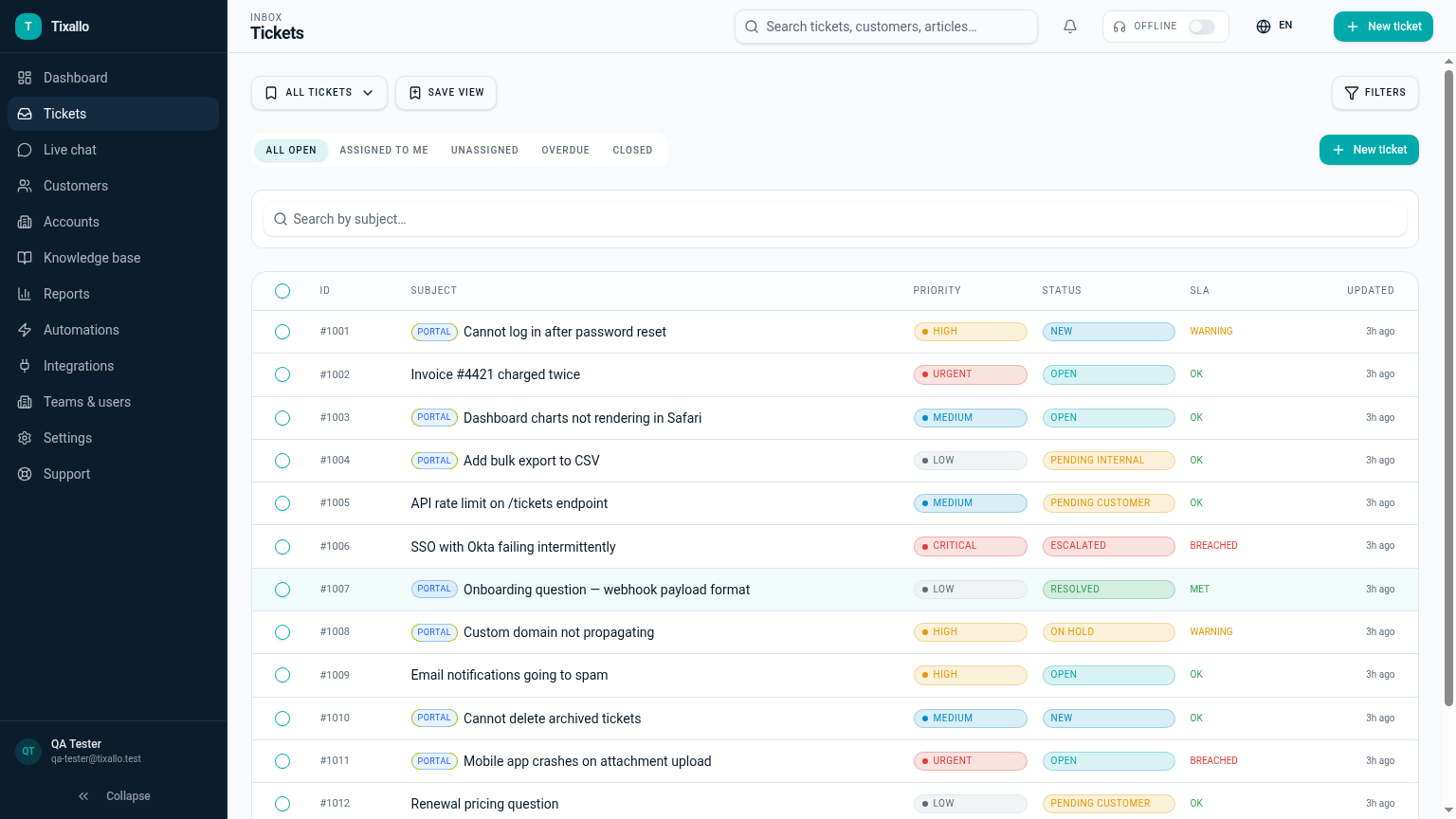
What Tixallo includes today
We only list features that are live in Tixallo right now. No roadmap-stuffing.
- Shared inbox with assignments, tags, internal notes
- Ticket merge for duplicate threads
- SLA timers + escalation rules
- Saved views and advanced filters
- Live chat + website form tickets in the same inbox
- Customer record auto-linked from sender email
- AI assist for summaries and reply drafting
Best fit / not best fit
This is a great fit if…
- Your team currently shares a Gmail or Outlook mailbox and it's getting messy.
- Multiple agents reply to the same threads and step on each other.
- You need clear ownership and SLA timers, not just a colour-coded label.
- You also want chat and forms in the same inbox.
Not the right pick if…
- You need a generic team email tool for sales / ops with no support workflows.
- You want a personal inbox tool with snooze + send-later as the main feature.
- You require offline-only mail clients.
Migration path
- 1
Sign up for Tixallo — no card needed.
- 2
Add your team and configure your support email forwarding.
- 3
Set up a couple of saved views (e.g. "unassigned", "my open tickets").
- 4
Drop the chat widget snippet on your site if you want chat in the same inbox.
- 5
Optional: import history from Zendesk, Freshdesk, Help Scout, Deskpro or CSV.
Tixallo shared inbox vs a shared mailbox
| Capability | Tixallo | Alternative |
|---|---|---|
| Real assignments | Yes — owner per ticket | Only colour labels |
| Internal notes | Yes | No (you BCC people) |
| SLA timers | Yes | No |
| Ticket merge | Yes | No |
| Saved views / filters | Yes | Basic |
| Chat + forms in same inbox | Yes | No |
Add Tixallo to your website in minutes
Website contact forms
Hosted form pages and copy-paste embeds turn site traffic into tickets — no developer required.
Add Tixallo to your websiteLive chat widget
A lightweight chat script your visitors can use immediately. Conversations land in the same shared inbox as email.
See live chatFrequently asked questions
Do I have to change my support email address?
No. Forward your existing support@yourdomain.com to your Tixallo inbound address — customers keep emailing the same address they always have.
Can two agents reply to the same ticket without collisions?
Tixallo shows assignments and presence so it's clear who's working a ticket. Internal notes let you hand off without forwarding the whole thread.
How does merge work?
When the same customer writes in twice (e.g. once via chat and once via email), you can merge the second ticket into the first — messages, attachments and tags come along.
Do SLA timers work on Free?
Yes. The shared inbox, assignments, notes, merge and SLA timers are part of the core product on Free.
Try Tixallo free
Free forever for small teams. Pro features free for 90 days. No credit card.