How to manage support emails (without a chaotic inbox)
A practical guide to managing support emails as a team — without missed replies, double-replies or a 5,000-email Gmail inbox.
Free forever for small teams · 90-day Pro trial · No credit card
Why teams switch to Tixallo
- Forward support@ to a real shared inbox so two people don't reply to the same email.
- Add assignment and internal notes so context isn't trapped in DMs.
- Tag and route by topic so the right person sees it first.
- Set SLAs so the urgent stuff doesn't get buried.
- Add a KB so customers can self-serve the easy 20 questions.
A quick look
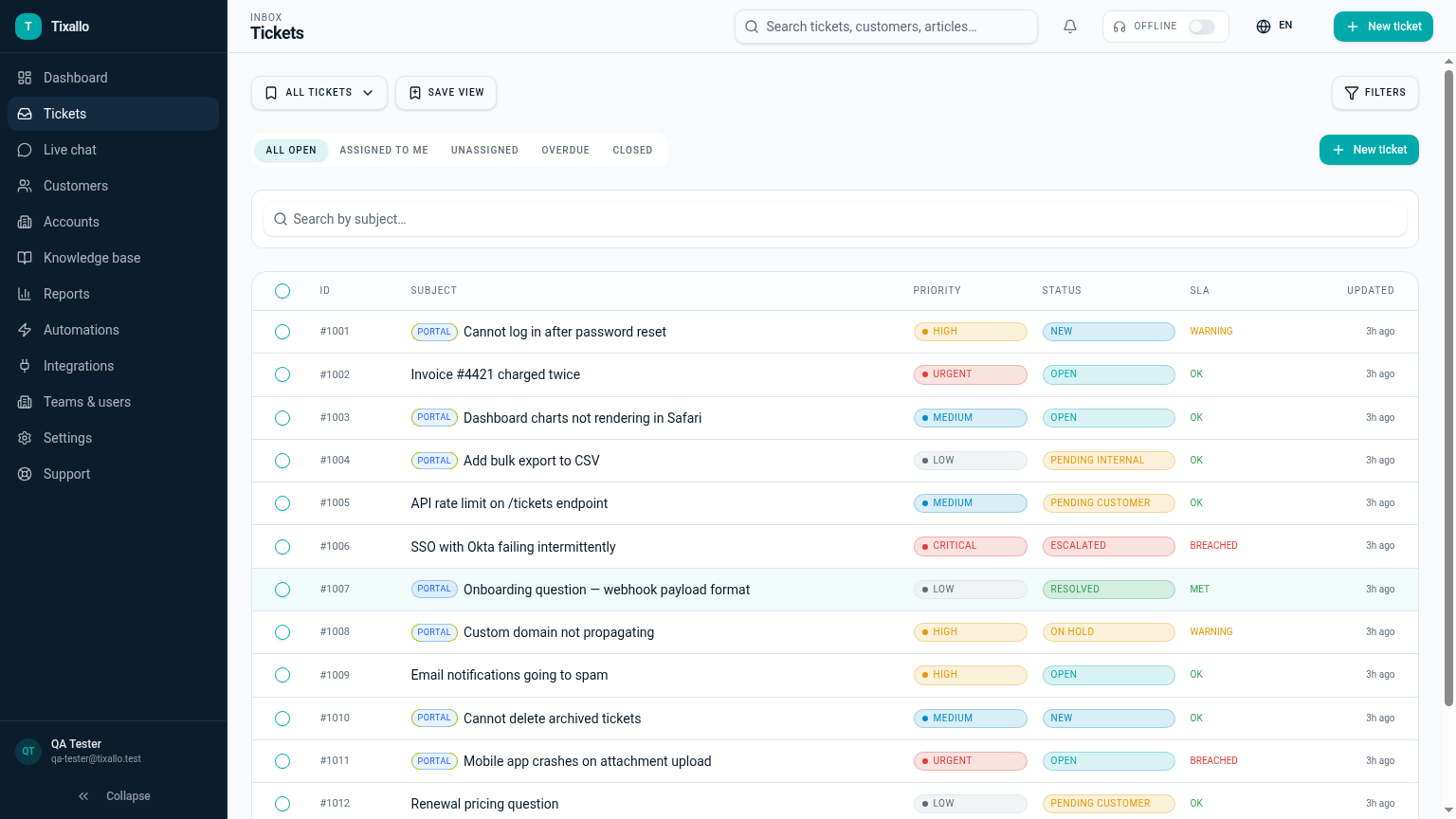
What Tixallo includes today
We only list features that are live in Tixallo right now. No roadmap-stuffing.
- Shared inbox with assignments, tags and internal notes
- Saved views and macros for repeating answers
- Automations to route, tag and prioritise (Pro trial)
- SLA reminders so urgent tickets don't slip (Pro trial)
- Public KB + customer portal for self-service
- Customers + Accounts CRM (auto-created from senders)
- Spam and phishing classifier on inbound channels
Best fit / not best fit
Tixallo is a great fit if…
- You're 2+ people answering the same support@ inbox.
- Things are slipping and you don't know why.
- You want a fix this week, not a 6-month rollout.
Tixallo is not the right pick if…
- You're a single user managing only personal email.
- You need a Gmail extension only.
- You need full Exchange calendar workflows.
Add Tixallo to your website in minutes
Website contact forms
Hosted form pages and copy-paste embeds turn site traffic into tickets — no developer required.
Add Tixallo to your websiteLive chat widget
A lightweight chat script your visitors can use immediately. Conversations land in the same shared inbox as email.
See live chatThe problem
A shared support@ mailbox in Gmail or Outlook works for the first few months, then breaks. Replies get duplicated because two people open the same thread. Important emails get marked-as-read and forgotten. There's no way to see who is responsible for what, no SLA clock, and no reporting beyond 'how full is the inbox today'. The fix isn't more discipline — it's structure: one ticket, one owner, one place to look.
Step-by-step
- 1
Forward your support alias into a shared inbox
Keep support@yourcompany.com. Add a forwarding rule that sends every incoming message to your Tixallo inbound address so each email becomes a ticket with an owner, status and history.
- 2
Assign every ticket to exactly one person
Make 'no owner' a temporary state, not a permanent one. Use round-robin auto-assignment, or have one triage shift each morning that clears the unassigned queue.
- 3
Use internal notes instead of DMs
Pull conversations about a customer into the ticket itself with internal notes and @-mentions. Six months later, anyone can read the whole story in one place.
- 4
Build 5–10 macros for your top answers
Look at your last 50 replies. The same five or ten answers will cover 60–70% of volume. Turn each into a macro so you write them once, not weekly.
- 5
Tag by topic and add 2–3 SLAs
Tag tickets by topic (billing, bug, how-to, refund). Add an SLA for 'first response' on the channels customers actually wait on, plus a tighter one for anything tagged 'urgent' or 'down'.
- 6
Publish a small knowledge base for the top 20 questions
Even 10 short articles dramatically reduce repeat email volume when linked from your contact form, footer and macros.
Common mistakes to avoid
- !Treating the shared mailbox as a team chat — replies get lost in threads.
- !Star/flag systems that only the original reader understands.
- !Forwarding internal context outside the thread — it gets stripped on the next reply.
- !Adding 30 tags before you've sent 30 tickets — start small, grow as patterns emerge.
- !Setting an SLA on every ticket; nobody reads dashboards full of red.
- !Hiding the knowledge base behind a login — most help-seekers leave before signing in.
How Tixallo helps
- Email-to-ticket system
Every forwarded email becomes a ticket with an owner, tags and SLA, while replies still go out from your support@ address.
- Shared inbox for support
One queue, real assignments, internal notes, and a viewing indicator so two people don't answer the same email.
- Ticketing system with knowledge base
Hosted KB + portal so customers self-serve the easy 20 questions before they email.
- Free ticketing software
Set the whole thing up on the free plan with the full Pro feature set free for 90 days.
Frequently asked questions
Do we have to change our support email?
No. Forward your existing support@ alias to Tixallo. Replies still go out from your support address.
How do we stop two people replying to the same email?
Every incoming email becomes a ticket with a single owner. The shared inbox shows who is assigned and shows a typing/viewing indicator so the team doesn't collide.
Can we keep using Gmail or Outlook on the side?
Yes. Most teams forward the shared support@ alias into Tixallo and keep personal Gmail/Outlook untouched. Replies sent from Tixallo go out as your support@ address.
How long does it take to set up?
Most teams are answering tickets the same day. Set up forwarding, invite teammates, replicate your top 5 macros.
Free plan?
Free forever for small teams (2 agents, 100 tickets / month). Pro features are free for the first 90 days, no card.
Try Tixallo free
Free forever for small teams. Pro features free for 90 days. No credit card.